Quick Verdict
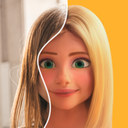
ToonMe is a consumer selfie-cartoon service in the Pho.to and Linerock product family. Its durable value is speed: upload a suitable portrait, select a cartoon, illustration, avatar, or full-body preset, and receive a shareable result without learning drawing software. It is not a professional illustration environment with controllable strokes, character sheets, vectors, or editable layers. Results depend heavily on pose, lighting, occlusion, and the selected effect, and may mishandle hair, hands, skin tone, text, or multiple faces.
Privacy deserves equal weight with visual quality. The official Pho.to policy says source photos and videos are sent through an encrypted connection for server-side processing. Some generative effects may use processors in jurisdictions including the United States and Singapore. A cartoon remains derived from an identifiable person, so users should obtain consent rather than treating stylization as anonymization.
Best For
ToonMe is best for people making casual profile pictures, contact images, holiday posts, and entertainment-oriented social portraits. It can help a creator test a few visual directions quickly, but it is not ideal for a brand mascot that must remain consistent across dozens of assets, a confidential portrait workflow, or a client deliverable requiring editable source files.
For broader photo correction, compare Fotor AI or Photoleap. For person-centered image and video generation, compare FacePlay. Template publishing and brand layouts are better served by Canva AI.
Key Features
- Automatic cartoon portraits: Detect a face and apply illustrated, cartoon, or avatar treatments.
- Preset library: Choose among face, portrait, and some full-body styles, with availability changing over time and by platform.
- Consumer finishing tools: Add backgrounds, filters, text, or animation where supported.
- Fast sharing: Export results for avatars and social posts with few manual steps.
- Web and mobile availability: Try the website or apps, while recognizing that features and purchases may differ.
- Finished-output workflow: Results are flattened creative assets, not vector or layered design documents.
Use Cases
Start with a clear, front-facing portrait containing one unobstructed face and even light. Generate two or three styles rather than purchasing immediately. Inspect the eyes, teeth, hairline, ears, hands, and background at full size, because a result that looks attractive as a thumbnail can contain visible defects.
For a company or creator account, check whether the likeness is respectful and whether the source photographer and subject authorized the intended use. Ask before processing a child, friend, customer, employee, or event guest. Do not assume a generated portrait is anonymous or free of personality rights simply because it looks illustrated.
Pricing
ToonMe is generally free to download or try with advertising and locked PRO content, then monetized through subscriptions and individual purchases. Trial periods, weekly, monthly, annual, and one-time offers vary by country, store, device, and promotion, so old fixed-dollar reviews are unreliable.
| Option | Price | Best use | Watch for |
|---|---|---|---|
| Web entry | Free access | Testing a basic effect | Limited tools, exports, or regional access |
| Mobile free version | $0 download | Occasional avatar creation | Ads, watermarks, or PRO locks may apply |
| Weekly PRO | Live store price | Short concentrated use | High unit cost and automatic renewal |
| Monthly or annual PRO | Live store price | Repeated use | Verify trial end and renewal date |
| Style or avatar purchase | Live store price | Unlocking selected content | May not include complete PRO rights |
Deleting the app normally does not cancel a subscription. Manage renewal through Apple ID or Google Play and retain confirmation.
Pros
- Very short path from a selfie to a recognizable cartoon portrait.
- Broad preset selection for avatars and lightweight social content.
- Web and mobile entry points make evaluation easy.
- Much faster than commissioning or manually drawing a casual avatar.
- The official privacy policy provides concrete information about processing and retention.
Cons
- Preset-driven output offers limited control over exact artistic direction.
- Side profiles, occlusion, groups, and complex backgrounds can fail.
- Trials and subscriptions vary by region and may renew automatically.
- Photos are uploaded for processing, with some effects involving third-party providers.
- Flattened outputs are not suitable replacements for editable vector or layered artwork.
Alternatives
| Tool | Best for | Advantage over ToonMe | Why choose ToonMe |
|---|---|---|---|
| FacePlay | Image and video effects | Broader model and motion scope | More focused cartoon-avatar workflow |
| Fotor AI | Retouching and marketing photos | More complete editor | Faster preset cartoon transformation |
| Photoleap | Portrait editing and AI creation | More photo editing and generation tools | Clear classic cartoon focus |
| Picsart AI | Art effects and general editing | More complete creative toolkit | More face-oriented avatar presets |
| Canva AI | Layout and social publishing | Better templates and brand collaboration | Fewer steps from selfie to cartoon image |
FAQ
Is ToonMe free?
There is free access, but ads, watermarks, styles, or export options may be limited. Treat the final store confirmation screen as the authoritative price and entitlement description.
Does deleting ToonMe cancel PRO?
Usually not. Cancel through the subscription settings of the Apple or Google account used for purchase.
How long are photos retained?
The Pho.to policy says originals and results for unregistered users who do not share within the service are generally removed within two weeks after the last interaction. Registered, shared content may remain until the user deletes it or requests removal.
Can I cartoonize another person’s selfie?
Only after obtaining clear consent for processing and publication. Facial landmarks and derived images are privacy-sensitive, and stylization does not eliminate likeness rights.
Can ToonMe export an editable vector avatar?
Do not treat its normal output as a layered vector source file. ToonMe primarily delivers a finished image for avatars and social sharing; editing individual paths, shapes, or layers requires rebuilding the result in vector-design software.
Bottom Line
ToonMe remains a convenient specialist for turning a suitable selfie into a social cartoon avatar. Use free access to test your own photo, verify renewal terms before paying, and distinguish app deletion from subscription or account deletion. Upload only authorized material that you are comfortable having processed on servers.